


Every AppSec team knows the pain: your SAST scanner runs overnight and delivers 2,000 findings by morning. Your security engineers start triaging, and hours later, half the findings turn out to be noise. That’s not a hypothetical - research consistently shows that approximately 30% of SAST findings are false positives, and some tools perform far worse.
This guide goes beyond generic advice. We’ll share original data on SAST accuracy, explain exactly why false positives happen with real code examples, give you a repeatable 7-step framework to cut noise by up to 80%, and compare how the top SAST tools handle false positives. Whether you’re a security engineer drowning in triage or a developer ignoring scanner output, this guide is for you.
The Real Cost of SAST False Positives
False positives aren’t just an annoyance - they carry measurable financial, operational, and cultural costs that compound over time.
The Data on SAST Accuracy
Academic and industry research paints a sobering picture of SAST tool precision:
- 18 to 36% precision rates for commercial SAST tools, meaning 64 to 82% of flagged findings are false positives (NIST SAST Tool Study)
- 56 to 68% false negative rates in parallel, meaning tools simultaneously miss real vulnerabilities while flooding teams with fake ones
- Organizations with 100,000+ lines of code routinely see 5,000 to 20,000 SAST findings per scan, of which 1,500 to 16,000 may be false positives
Time and Dollar Cost
Each false positive takes 15 to 30 minutes to triage, investigate, and close. At an average security engineer salary of $150K/year (~$72/hour), the math is stark:
| Metric | Conservative | Typical | Severe |
|---|---|---|---|
| Findings per scan | 5,000 | 10,000 | 20,000 |
| False positive rate | 30% | 50% | 80% |
| False positives per scan | 1,500 | 5,000 | 16,000 |
| Triage time (at 20 min each) | 500 hrs | 1,667 hrs | 5,333 hrs |
| Annual cost (monthly scans) | $432K | $1.44M | $4.6M |
These numbers don’t include the opportunity cost: every hour spent on a false positive is an hour not spent fixing a real vulnerability.
Alert Fatigue Destroys Security Culture
The hidden cost is cultural. When developers see scan after scan flagging code they know is safe, they stop paying attention. Threads like this one on r/devops capture the sentiment - developers call SAST tools “noise generators” and start ignoring all findings, including the real ones.
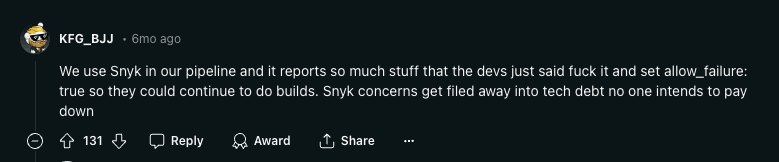
Alert fatigue creates a vicious cycle: more false positives → less developer trust → fewer fixes applied → more vulnerabilities in production. This security community thread shows how pervasive the problem is.

Why SAST Tools Produce False Positives
Understanding the root causes is the first step toward reducing false positives. There are five primary reasons SAST tools flag safe code as vulnerable.
1. Lack of Runtime Context
SAST tools analyze source code without executing it. They can’t determine what values variables hold at runtime, which execution paths are actually reachable, or whether external inputs are attacker-controlled.
Example - Flagged as SQL Injection (False Positive):
# SAST flags this as SQL injection
def get_system_config(config_key: str) -> dict:
    # config_key comes from an internal enum, never from user input
    query = f"SELECT value FROM system_config WHERE key = '{config_key}'"
    return db.execute(query).fetchone()

# Called only from internal initialization
config = get_system_config(SystemConfigKeys.MAX_RETRY_COUNT)
The scanner sees string interpolation in a SQL query and flags it. But config_key comes from a hardcoded enum, never from user input. Without runtime context, the scanner can’t know the input is trusted.
2. Over-Broad Pattern Matching
Most SAST rules use pattern matching or regex-based detection. They look for syntactic patterns that could be dangerous without verifying whether they actually are.
Example - Flagged as Hardcoded Secret (False Positive):
// SAST flags this as a hardcoded cryptographic key
const TEST_JWT_TOKEN = "eyJhbGciOiJIUzI1NiIsInR5cCI6IkpXVCJ9.eyJ0ZXN0IjoidHJ1ZSJ9.abc123";

describe("JWT validation", () => {
  it("should reject expired tokens", () => {
    expect(() => validateToken(TEST_JWT_TOKEN)).toThrow("Token expired");
  });
});
The scanner matches the pattern of a JWT-like string assigned to a variable. It doesn’t understand that this is a test file, the token is intentionally invalid, and it’s never used in production code.
3. Missing Business Logic Awareness
SAST tools have no understanding of application-specific security controls, custom sanitization functions, or business rules that mitigate risk.
Example - Flagged as XSS (False Positive):
# SAST flags this as potential XSS
def render_user_profile(request):
    username = request.GET.get("username")
    sanitized = company_sanitizer.clean(username)  # Custom sanitization library
    return render_to_string("profile.html", {"username": sanitized})
The company has a well-tested custom sanitization library (company_sanitizer) that strips all HTML and JavaScript. The SAST tool doesn’t know about this custom control and flags the output as vulnerable.
4. Framework-Specific Blind Spots
Modern frameworks include built-in security mechanisms that SAST tools often fail to recognize. Django auto-escapes template variables, Spring Security provides CSRF protection by default, and Rails uses parameterized queries through ActiveRecord.
Example - Flagged as XSS in Django (False Positive):
# SAST flags render_to_string as XSS risk
from django.template.loader import render_to_string

def get_email_body(user):
    return render_to_string("email/welcome.html", {
        "name": user.display_name  # Flagged: "unsanitized user input"
    })
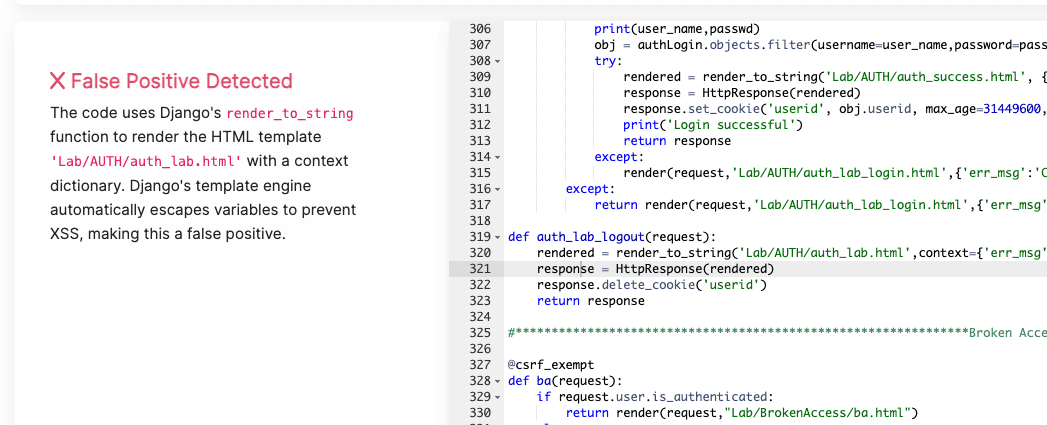
Django’s template engine automatically escapes all variables by default. The {{ name }} in the template will be HTML-escaped, preventing XSS. The scanner doesn’t account for this framework-level protection.

5. Configuration Drift
SAST tools ship with default rule sets designed for broad coverage. Over time, as codebases evolve, these defaults drift further from the project’s actual risk profile, creating a growing gap between what the scanner checks and what matters.
Example - Flagged as Information Exposure (False Positive):
# SAST flags this as "Exposure of Private Personal Information"
class TestUserFactory:
    """Factory for generating test user data in CI pipeline"""
    @staticmethod
    def create_test_user():
        return {
            "email": "test@example.com",
            "ssn": "000-00-0000",  # Flagged: hardcoded PII
            "phone": "555-0100"
        }
This is a test data factory in the test suite. The “PII” is fake test data that never touches production. Without path-based exclusions for test directories, the scanner flags it as a data exposure issue.
False-positive triage workflow
Use the same workflow for every finding before closing it as a false positive or requesting an exception. The goal is to make the disposition reproducible: another engineer should be able to follow the record and reach the same conclusion.
- Confirm location. Check that the finding refers to the current repository, branch, commit, file, and line or symbol. Scanner locations can become stale after a rename or a refactor. If the code no longer exists, record that and rescan before closing the finding.
- Trace input to sink. Identify the source of input, each meaningful transformation, and the flagged sink. For a data-flow finding, do not stop at the line the scanner reports. Follow the value into callers and across files until you can show whether untrusted input reaches the sink.
- Check sanitization and validation. Verify the control that is supposed to make the flow safe. Read the implementation or framework documentation for custom sanitizers, validators, encoders, parameterized query builders, and authorization checks. Confirm that the control handles the vulnerability class and runs on every relevant path.
- Confirm deployed-path reachability. Determine whether a user or another untrusted actor can reach the code in the deployed application. Check entry points, routes, message consumers, feature flags, authentication boundaries, deployment configuration, and whether the code is test-only or generated. A branch that is inactive today can become active later, so record the condition that makes it unreachable.
- Classify. Set the finding to confirmed true positive, false positive, unknown, or an exception that needs risk acceptance. A finding with real risk but an accepted mitigation is not a false positive. Keep it separate so the team can revisit the decision.
- Assign owner. Assign the engineering owner who can change the code or maintain the mitigating control. For exceptions, also name the security owner responsible for the review and expiry.
- Record evidence. Save the commit SHA, data-flow notes, relevant configuration or test output, links to code, and the reasoning behind the classification. Avoid a bare “not exploitable” comment because it cannot be reviewed or revalidated.
- Revalidate after code changes. Rescan after remediation, framework upgrades, route changes, or modifications to the sanitization and validation logic. Reopen the finding if the evidence no longer holds, then repeat the workflow from the affected step.
Exception record template
Use an exception record when the finding is valid or uncertain, but the team needs to defer remediation. Store it with the finding or in the related ticket, where reviewers can find it during a rescan.
| Field | What to record |
|---|---|
| Finding ID | The scanner’s stable finding identifier and a link to the finding |
| Repo/branch | Repository, branch, commit SHA, and affected path |
| Rule or class | Scanner rule ID and vulnerability class |
| Suppression reason | Why remediation is deferred or why the suppression is needed |
| Evidence | Data-flow notes, code links, configuration, test results, and deployment context |
| Approver | The person authorized to accept the exception |
| Owner | The engineer or team responsible for remediation or the mitigating control |
| Expiry | A review date or a defined event that ends the exception |
| Revalidation trigger | Changes that require review, such as a code change, dependency upgrade, route change, or rescan |
| Related ticket | The remediation, risk-acceptance, or tracking ticket |
| Residual risk | What remains exploitable, who could reach it, and the mitigation that reduces the risk |
An expiry and revalidation trigger keep an exception from becoming a permanent suppression. If either field is missing, leave the finding open until the owner and approver supply it.
7 Steps to Cut SAST False Positives by 80%
Reducing false positives requires a systematic approach, not one-off tweaks. Follow this framework in order - each step builds on the previous one.
Step 1: Tune Your Scanner Configuration
Start with what you can control immediately: your tool’s settings.
Before (default config):
- All rules enabled, including informational findings
- Scanning entire repository including
node_modules, test fixtures, and vendored code - Default severity thresholds with no customization
After (tuned config):
- Disable rules irrelevant to your stack (e.g., C++ memory rules for a Python project)
- Exclude test directories, vendored code, generated files, and build artifacts
- Set minimum severity thresholds to focus on High and Critical findings first
- Configure language-specific rule packs instead of using the universal rule set
Action items:
- Audit your current enabled rules - disable any that have produced >90% false positives over the past 3 months
- Add path exclusions for
**/test/**,**/tests/**,**/__tests__/**,**/fixtures/**,**/vendor/**,**/node_modules/** - Review your scanner’s language/framework presets and enable the correct ones for your stack
Step 2: Define Contextual Security Policies
Generic rules don’t account for your organization’s specific security posture. Define policies that encode your team’s security decisions.
What this looks like in practice:
- Mark specific custom sanitization functions as trusted sinks
- Define which environment variables and configuration sources are considered safe
- Specify which internal APIs are behind authentication and don’t need re-validation
- Identify code paths that are internal-only vs. internet-facing
Tools like Corgea’s PolicyIQ automate this by learning your organization’s security context and applying it during triage. Instead of writing manual suppression rules for every false positive, PolicyIQ lets you define organizational policies - such as “our custom sanitize() function handles XSS” or “all endpoints in /internal/ require VPN access” - and automatically applies them across all findings.
When you compare SAST solutions, require each vendor to show how these contextual policies affect real findings in your own codebase.
Step 3: Automate Triage Workflows
Manual triage doesn’t scale. Build automation that handles the repeatable decisions so humans focus on the genuinely ambiguous findings.
Triage automation checklist:
- Auto-close findings in test files and generated code
- Auto-assign findings to code owners based on file paths
- Group related findings (e.g., same vulnerability type in the same function) into single tickets
- Route findings through a decision tree: scanner confidence level → file context → historical false positive rate for this rule → human review
Before automation: Every finding goes into one backlog. Security engineers manually review 5,000 findings.
After automation: 60% of findings are auto-triaged (closed as test/generated code, or grouped into existing tickets). Security engineers review 2,000 unique findings, of which 800 are pre-scored as high-confidence.
Step 4: Build Developer Feedback Loops
Developers are the best judges of whether a finding is real. Build a frictionless way for them to provide feedback, and use that feedback to improve scanner accuracy.
Effective feedback loop:
- When a developer marks a finding as false positive, capture the reason (test code, framework protection, custom control, dead code, etc.)
- Aggregate reasons by rule ID to identify the noisiest rules
- Feed patterns back into scanner configuration (Step 1) and policy definitions (Step 2)
- Track false positive rate by rule over time and set alerting thresholds
Example report showing false positive patterns by vulnerability type:
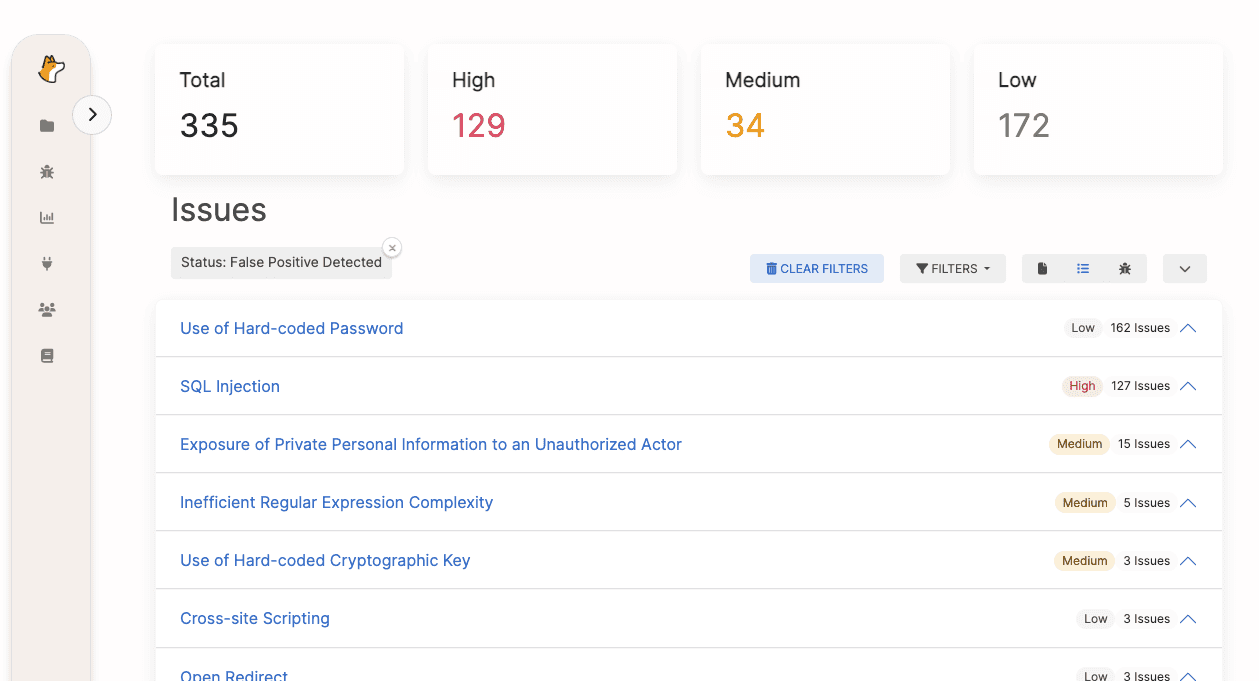
In this report, Hard-coded Passwords and SQL Injection show disproportionately high false positive rates. This pattern signals that scanner rules for these categories need immediate tuning or policy-level exceptions.
Step 5: Customize and Write Your Own Rules
Default rules are designed for the general case. Write custom rules or modify existing ones to match your codebase’s specific patterns.
Custom rule examples:
- Suppress SQL injection findings where the query uses your ORM’s parameterized query builder
- Mark your internal
@Sanitizedannotation as a trusted data flow barrier - Add a rule that flags your actual high-risk patterns that the default rule set misses
Before (generic rule): Flag any string concatenation inside a function that calls db.execute()
After (custom rule): Flag string concatenation in db.execute() only when the concatenated variable traces back to request.*, sys.argv, or os.environ - not internal constants or enum values
Step 6: Apply Reachability Analysis
Not all code paths are reachable. If a vulnerable function is never called from an entry point, or its input is always sanitized before reaching the vulnerable sink, the finding is noise.
Reachability analysis checks:
- Is the flagged function called from any public entry point (HTTP handler, CLI command, message consumer)?
- Does the data flow from an untrusted source to the vulnerable sink without passing through sanitization?
- Is the code in a dead branch, behind a feature flag that’s permanently off, or in a deprecated module?
Modern SAST tools with data-flow analysis can do some of this automatically. For tools that lack it, manual reachability review of high-severity findings is worth the time investment.
Step 7: Deploy AI-Powered Triage
AI and large language models (LLMs) represent the biggest leap forward in false positive reduction because they can understand code semantically - not just syntactically.
What AI-powered triage does that rules can’t:
- Understands that
render_to_stringin Django auto-escapes, making XSS findings false positives - Recognizes that a JWT token in a test file named
test_auth.pyis a test fixture, not a leaked secret - Identifies that a custom
company_sanitizer.clean()function handles the flagged vulnerability class - Provides natural-language explanations for why each finding is or isn’t a true positive
Corgea’s AI-powered triage achieves this by combining LLM analysis with static analysis context. It reads the surrounding code, understands framework conventions, and cross-references organizational security policies to deliver findings with clear, actionable explanations.
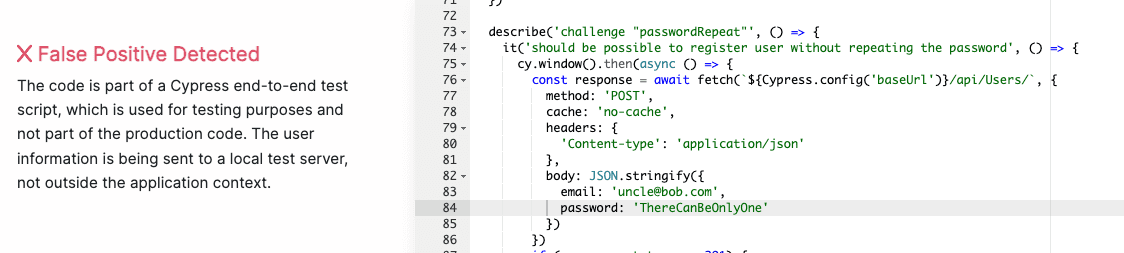
Example: Corgea identifying a hard-coded key false positive in a test suite
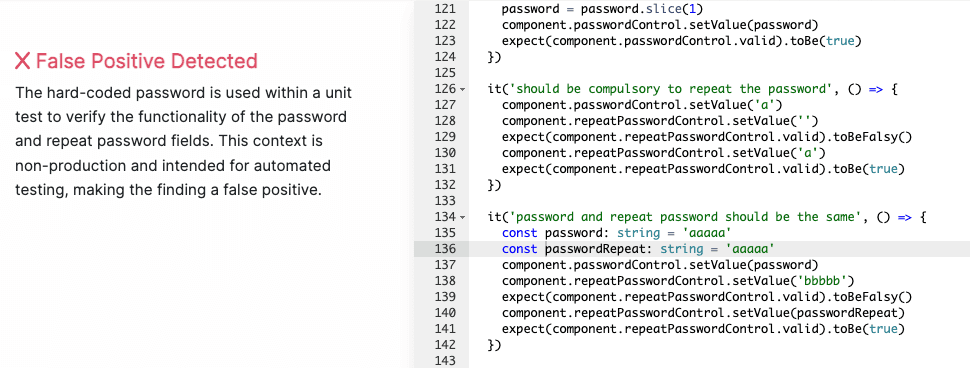
Example: Corgea recognizing Django’s auto-escaping prevents XSS
How Top SAST Tools Handle False Positives
Not all SAST tools are created equal when it comes to false positive management. Here’s how the major players compare - for a broader feature-by-feature breakdown, see our guide to the best SAST tools:
| Capability | Corgea | Snyk Code | Semgrep | Checkmarx SAST | SonarQube |
|---|---|---|---|---|---|
| AI-Powered Triage | Yes - LLM-based contextual analysis with natural-language explanations | Limited - ML-based severity scoring | No - rule-based only | Limited - ML-assisted prioritization | No - rule-based only |
| False Positive Detection | Dedicated false positive identification engine; ~30% reduction reported | Basic ML scoring; no dedicated FP detection | Community rules help; no automatic FP detection | CxSAST ML models; inconsistent accuracy | Manual “Won’t Fix” tagging only |
| Contextual Policy Engine | PolicyIQ - organization-wide security policies applied automatically | Project-level ignore rules | Custom rule writing (powerful but manual) | Customizable queries via CxQL | Quality profiles with rule activation |
| Reachability Analysis | Yes - data-flow + reachability | Partial - inter-file data flow | Yes - cross-file analysis with Pro rules | Yes - deep data-flow analysis | Limited - intra-file only |
| Developer Feedback Loop | Built-in - developer FP feedback trains future triage | Manual ignore via CLI/UI | Manual nosemgrep comments | Manual triage states in dashboard | Manual resolution tagging |
| Custom Rule Support | AI-generated policies + manual rules | Limited custom rules via Snyk API | Excellent - community + custom YAML rules | CxQL custom queries (steep learning curve) | Custom rules via Java/XPath plugins |
| Framework Awareness | Broad - auto-detects Django, Spring, Rails, Express, React protections | Good framework coverage | Framework-specific rule packs | Extensive framework presets | Moderate framework support |
| Integration Depth | CI/CD, IDE, ticketing, existing SAST tool overlay | CI/CD, IDE, SCM native | CI/CD, IDE, pre-commit hooks | CI/CD, IDE, ALM platforms | CI/CD, IDE, Quality Gates |
Key Takeaways From Tool Comparison
Best for AI-powered triage: Corgea is the only tool with a dedicated LLM-based false positive detection engine that provides natural-language explanations. This is critical for developer adoption - when developers understand why a finding was flagged or dismissed, they trust the tool.
Best for custom rules: Semgrep’s rule-writing experience is best-in-class for teams that want to hand-author detection patterns. However, custom rules alone can’t solve the false positive problem because the root causes are contextual, not syntactic.
Best for enterprise compliance: Checkmarx has the deepest enterprise ALM integrations and CxQL provides powerful (if complex) query customization for compliance-driven organizations.
Overall recommendation: The most effective approach is to layer AI-powered triage on top of your existing SAST tool. This is exactly what Corgea is designed for - it integrates with Checkmarx, SonarQube, Semgrep, Snyk, and others to analyze their findings and automatically identify false positives.
Measuring Your False Positive Reduction
Track outcomes by scanner, repository, rule, and vulnerability class. Review the measures below over the same time window, and keep unknown findings in the denominator instead of silently dropping them.
Use the same metrics during a SAST tool comparison, otherwise the pilot will reward alert volume instead of trusted security signal.
| Metric | Definition | What it tells you |
|---|---|---|
| Confirmed true-positive rate | Confirmed true positives divided by all findings triaged in the period | Whether the scanner produces findings that require remediation |
| False-positive rate | Findings classified as false positives divided by all findings triaged in the period | Which rules, frameworks, or repositories need tuning |
| Unknown rate | Findings still classified as unknown divided by all findings triaged in the period | Whether the team lacks evidence, ownership, or time to reach a decision |
| Suppression rate | Findings suppressed by policy, configuration, or inline annotations divided by all findings in the period | Whether suppressions are replacing triage and whether they need review |
| Median triage time | Median time from finding creation to a recorded classification | The typical time a finding waits for a decision without letting a few long cases distort the result |
| Reopened exceptions | Count and percentage of expired or re-opened exceptions | Whether previous evidence or compensating controls still hold |
| Fix acceptance rate | Remediation pull requests accepted or merged divided by remediation pull requests proposed | Whether findings and suggested fixes are actionable for developers |
| Closed after rescan | Findings marked fixed only after a clean rescan divided by findings closed as fixed | Whether the team confirms remediation instead of closing findings on intent alone |
Keep the classification counts alongside the rates. A lower false-positive rate may only reflect more findings marked unknown, while a high suppression rate can hide a rule that needs better configuration.
Benchmark targets:
| Metric | Poor | Average | Good | Excellent |
|---|---|---|---|---|
| False positive rate | >70% | 40-70% | 20-40% | <20% |
| Mean time to triage | >30 min | 15-30 min | 5-15 min | <5 min |
| Developer fix rate | <10% | 10-30% | 30-60% | >60% |
Frequently Asked Questions
What is a false positive in vulnerability scanning?
A false positive in vulnerability scanning is a finding that a security tool flags as a vulnerability, but that is not actually exploitable or poses no real risk. In SAST specifically, this typically occurs when the scanner lacks runtime context, misinterprets safe coding patterns, or does not understand framework-specific protections like Django’s auto-escaping or Spring Security’s built-in CSRF defense.
False positives are distinct from true positives (real vulnerabilities) and false negatives (real vulnerabilities the tool misses). A mature security program tracks all three to optimize scanner effectiveness.
How do you identify if a SAST finding is a false positive?
Follow this systematic verification process:
- Trace the data flow: Does user-controlled input actually reach the flagged function? If the input comes from a hardcoded constant, internal API, or database lookup (not direct user input), it’s likely a false positive.
- Check framework protections: Does the framework handle this vulnerability class automatically? Django escapes template variables, Rails uses parameterized queries via ActiveRecord, and Spring Security applies CSRF tokens by default.
- Review the file context: Is this code in a test file, migration script, or development fixture? Test data is almost always a false positive.
- Verify sanitization: Is there a sanitization function between the input source and the vulnerable sink that the scanner might not recognize?
- Check reachability: Is this code actually called from any entry point? Dead code and unused functions can’t be exploited.
What is a good false positive rate for SAST?
Industry research shows most commercial SAST tools operate with precision rates between 18% and 36%, translating to false positive rates of 64 to 82%. A well-tuned SAST deployment should aim for a false positive rate below 30%. With AI-powered triage tools like Corgea layered on top, organizations can achieve effective false positive rates under 15%.
The key word is “effective” - you may not reduce the raw number of findings your scanner produces, but you can dramatically reduce the number that require human review by automating disposition of high-confidence false positives.
Why do SAST tools have so many false positives?
SAST tools face a fundamental trade-off between recall (catching every possible vulnerability) and precision (only flagging real ones). Most tools are deliberately tuned for high recall because missing a real vulnerability (false negative) has worse consequences than flagging a safe one (false positive).
The five specific root causes are:
- No runtime context - can’t determine variable values or execution paths at runtime
- Pattern matching limitations - syntactic patterns can’t capture semantic meaning
- Missing business logic - unaware of custom security controls and sanitization
- Framework blind spots - don’t recognize built-in framework protections
- Configuration drift - default rules don’t match the project’s actual risk profile
Can AI reduce SAST false positives?
Yes, significantly. AI and large language models bring three capabilities that rule-based scanners lack:
- Semantic understanding: LLMs can read code like a developer and understand intent, not just syntax. They recognize that
company_sanitizer.clean()is a security control even if it’s not in any standard library. - Contextual reasoning: AI can connect information across files - understanding that a variable initialized from a hardcoded enum three files away is not attacker-controlled.
- Framework knowledge: LLMs are trained on millions of codebases and inherently understand that Django templates auto-escape, Rails uses parameterized queries, and Spring Security provides CSRF protection.
Organizations using AI-powered triage like Corgea report 30% or greater reduction in false positives, with the additional benefit of natural-language explanations that help developers understand and trust the results.
What is the difference between a false positive and a false negative in SAST?
| False Positive | False Negative | |
|---|---|---|
| Definition | Tool flags safe code as vulnerable | Tool misses a real vulnerability |
| Impact | Wastes triage time, causes alert fatigue | Leaves exploitable code in production |
| Risk | Indirect - erodes developer trust | Direct - can lead to security breaches |
| Mitigation | Tune rules, add context, AI triage | Improve scanner coverage, add complementary tools |
Both are problematic, but they require different solutions. Reducing false positives through better configuration and AI-powered triage typically improves true positive detection as well, because security teams can focus their limited time on genuinely suspicious findings instead of chasing noise.
What to Do Next
Reducing SAST false positives is not a one-time project - it’s an ongoing practice. Start with the highest-impact steps:
- This week: Audit your scanner configuration. Exclude test directories and disable rules with >90% false positive rates.
- This month: Implement automated triage workflows to handle the obvious false positives (test files, generated code, vendored dependencies).
- This quarter: Evaluate AI-powered triage to automate contextual analysis. Book a Corgea demo to see how much noise you can eliminate from your current SAST tool.
The organizations that get this right don’t just reduce triage time - they fundamentally change how developers relate to security tooling. When findings are trustworthy, developers fix them. When developers fix them, your applications get more secure. That’s the goal.