

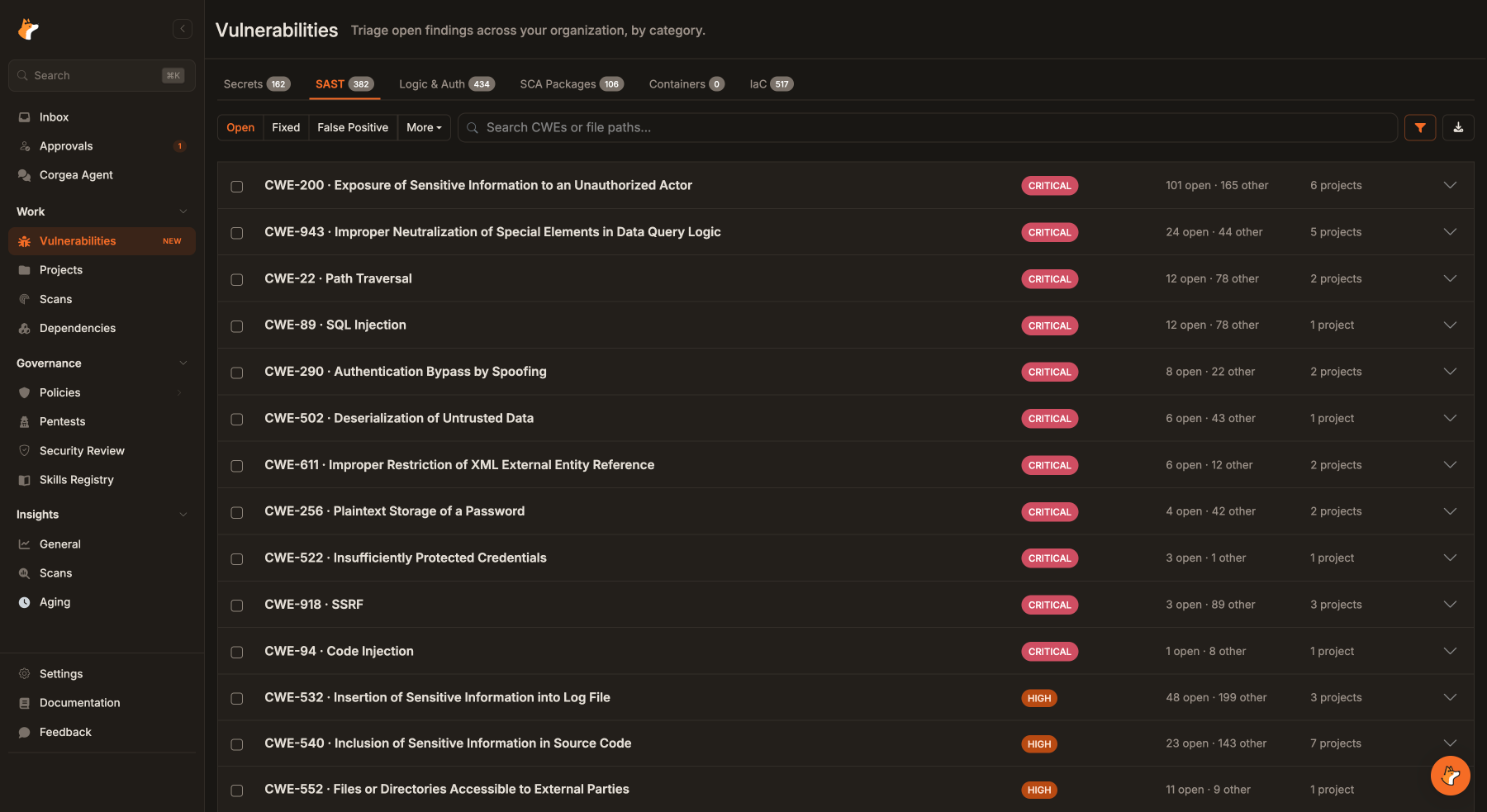
 The Vulnerabilities Workbench groups open findings by type and weakness across every project.
Between July 1 and September 30, we shipped 52 releases of Corgea: web app v1.67.0 through v1.79.5, plus CLI v1.12.0 through v1.14.2. Together they add up to more than 270 changes.
Corgea is an AI-powered application security platform. It scans code, dependencies, containers, IaC, and secrets, filters out false positives, and generates fixes you review and merge in a pull request. Q3 took it past finding and fixing. Corgea now runs autonomous pentests against running applications. It gives security teams one place to triage every finding type, and the controls to govern those decisions at enterprise scale. It covers more of the software supply chain. And it plugs into the AI coding tools developers already use.
Here’s what changed. Every line item is in the changelog.
Q3 at a glance
- AI Penetration Testing (beta): autonomous external assessments of your web apps, with a live agent tree and PDF reports.
- Vulnerabilities Workbench: triage every finding type across every project, in bulk.
- Triage approval workflows: a second reviewer for false-positive and accepted-risk decisions, and a real explanation for every false positive.
- Software supply chain: Blocking Rules for malicious packages and restricted licenses, CycloneDX SBOMs, Rust support, and private registries for enterprise customers.
- AI coding agents:
corgea mcp installadds the Corgea MCP server to Cursor, Claude Code, Windsurf, VS Code, and four more tools. - Faster CI: CLI AI SAST scans are incremental by default, and GitHub PR scans wait until a draft is ready for review.
- Integrations and admin: Linear, self-hosted GitLab, Bitbucket scanning, SSO group mapping, GitHub team membership sync, and email OTP.
- Reporting: branded PDF reports, PDFs for clean scans, and cleaner SARIF exports.
AI Penetration Testing
AI Penetration Testing is now in beta as an add-on. If you want the background first, read how AI pentesting works and our launch post. Add a target, start a run, and autonomous agents assess your application from the outside. You follow the run live. Findings are revalidated, and you get a completion email and a technical or executive PDF report (v1.67.0).
Test behind the login
A guided target setup wizard (v1.77.1) walks you through each target. Add multiple login accounts and optional TOTP credentials so agents can test behind your login. Where email support is enabled, dedicated inboxes let agents complete email verification, password resets, and emailed login codes.
Watch every agent
The live pentest agent tree (v1.78.0) shows what each agent is doing, with clearer activity summaries and accurate statuses. Every finding is attributed to the agent that reported it.
Fit it into your workflow
Completed AI pentests now trigger a webhook (v1.74.0). Smaller fixes prevent accidental duplicate runs and add CWE weakness names to pentest findings.
Learn more: AI Pentest product page
Docs: AI Penetration Testing
Vulnerabilities Workbench
Triage every finding type across every project from one page. The Vulnerabilities Workbench (v1.71.2) has a tab for each type: Secrets, SAST, Logic & Auth, SCA Packages, Containers, and IaC.
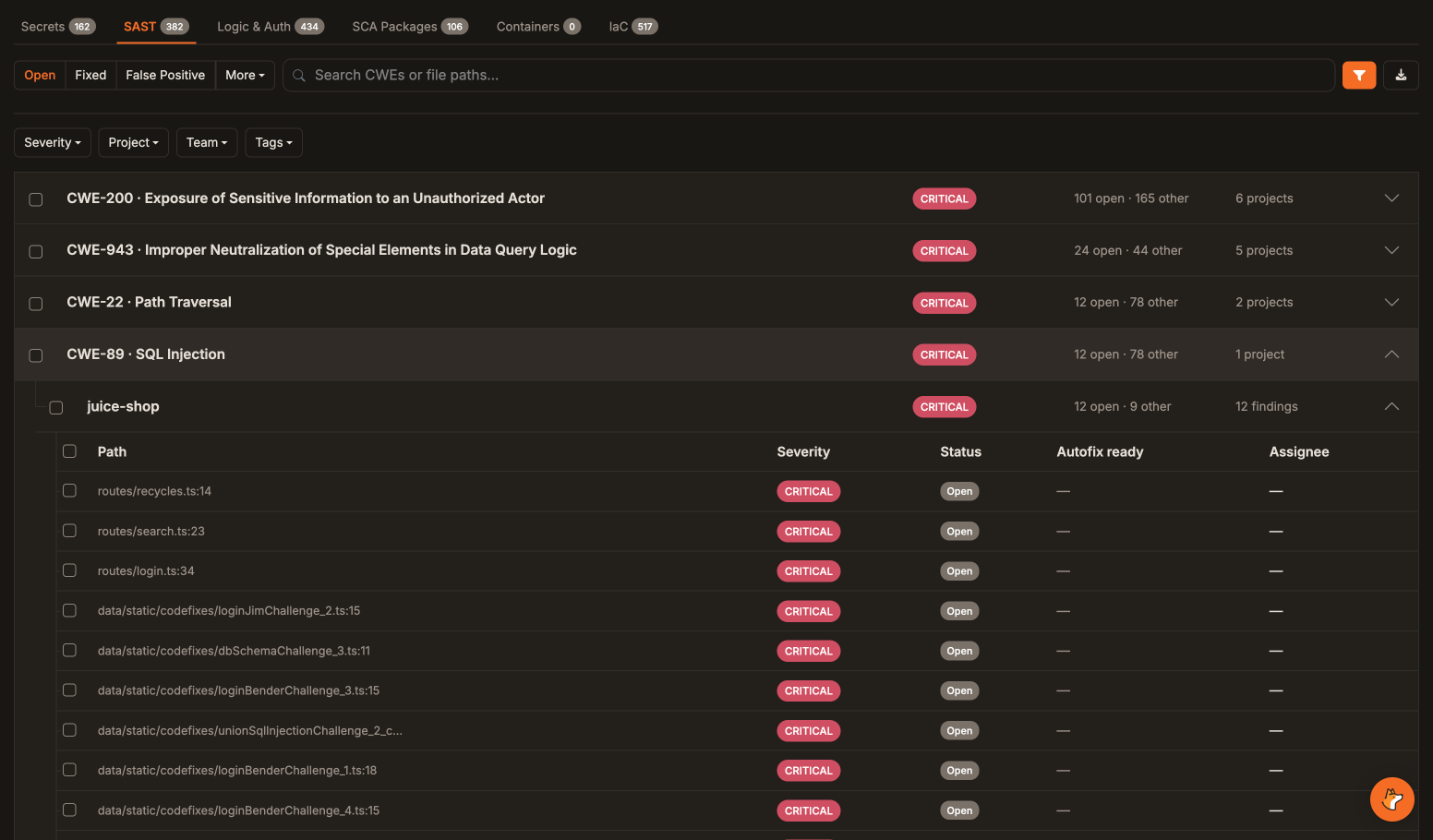 Drill from a weakness to the affected projects and individual findings. Filter by severity, project, team, or tag.
- Filter by how your org works. Narrow results by severity, project, tag (v1.73.0), or team (v1.78.1). The team filter carries through to exports and bulk selections.
- Act in bulk. Assign and triage many findings at once, and export the filtered view to CSV.
- Stay in context. Open any finding in a drawer without leaving the list.
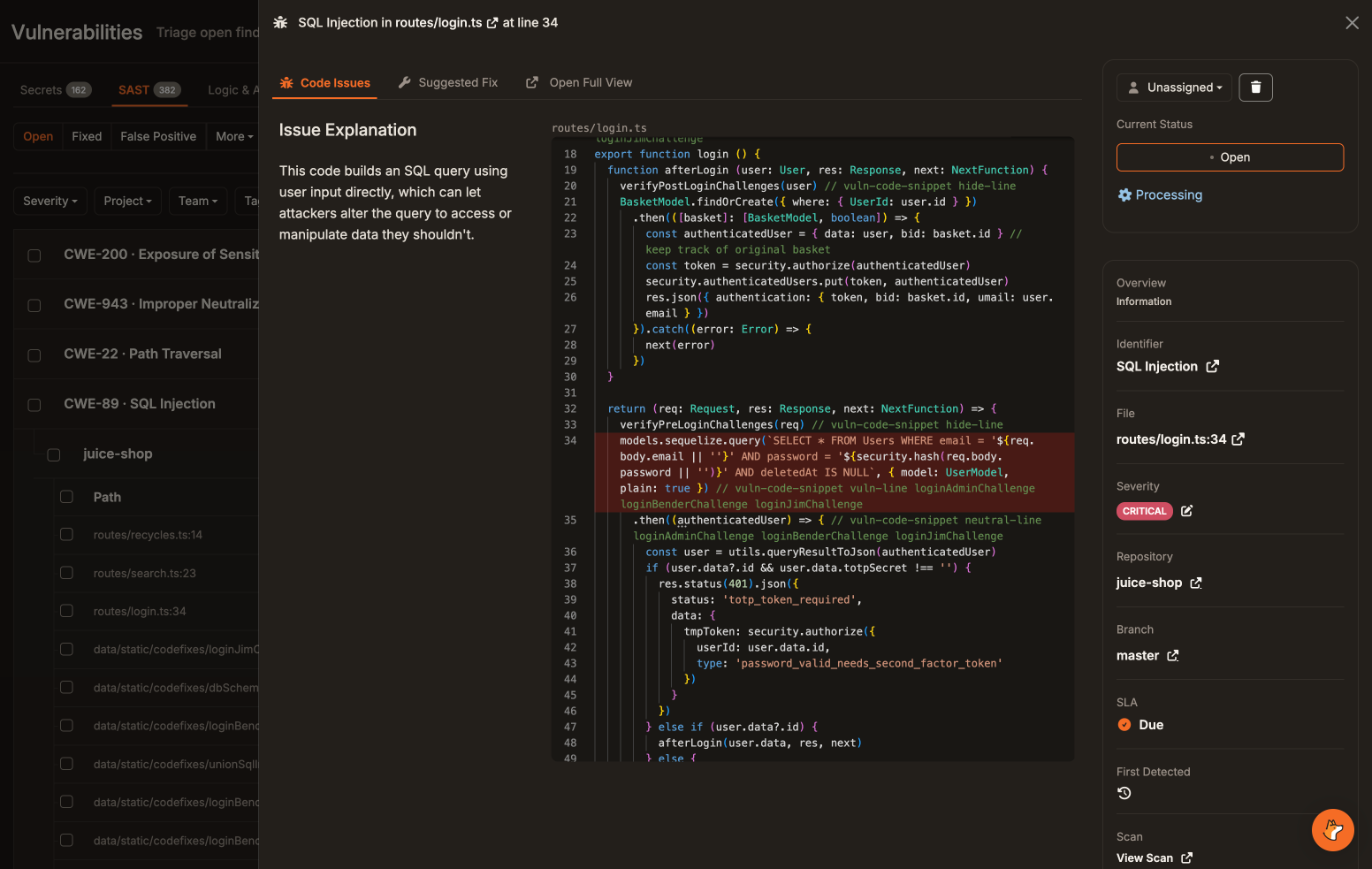 A finding drawer shows the explanation, the vulnerable code, and triage controls, with the suggested fix one tab away.
Advanced Vulnerability Search now covers SCA and IaC findings (v1.69.0), with inline SCA and container details and IaC triage controls (v1.76.3). Pagination and caching removed the old 30,000-finding limit on CSV exports (v1.75.2).
The Workbench is available on supported plans.
Docs: Vulnerabilities Workbench
Triage governance and approval workflows
Dismissing a finding is a security decision. Q3 added the controls to govern it.
Approval workflows
Admins can now require a second reviewer for false-positive decisions, accepted-risk decisions, or both (v1.75.3). With approval on, marking a finding creates a request instead of changing its status. Reviewers work from a searchable queue, leave notes for the requester, and see each request’s history. Notifications and a dedicated reviewer permission come with it. A reviewer filter (v1.78.3) finds requests approved or rejected by a specific person.
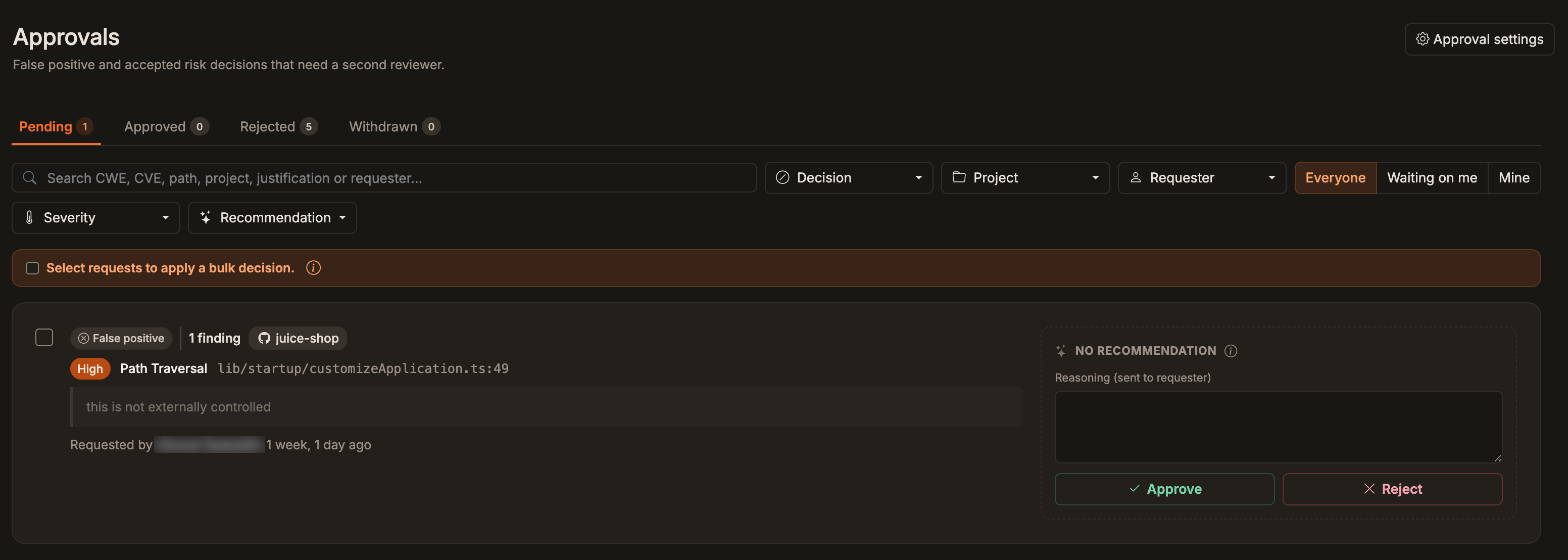 One queue holds pending requests, with the requester’s justification next to the reviewer’s reasoning.
Where triage suggestions are enabled, reviewers also get suggested approve and reject responses for bulk triage requests, with editable notes and a confirmation step (v1.79.0).
Justifications that explain the decision
False-positive and accepted-risk decisions now need a meaningful reason (v1.75.3). For false positives, that means explaining why the finding isn’t a real vulnerability, including in bulk actions and Corgea Agent comments (v1.76.0). AI reviews each justification and asks for more detail when a comment only repeats the decision. (For the broader problem, see how to reduce false positives in SAST.)
Bulk triage through the API
A bulk triage API (v1.72.2) applies and audits status changes across SAST and SCA findings. Approval policies and safeguards cover higher-impact actions, including in agent workflows (v1.73.0). Non-admin API requests follow the company’s approval settings (v1.79.4).
Automatic triage rules
Where enabled, admins can set a default status, comment, and accepted-risk expiry for new SAST and SCA findings, matched by project name or repository URL pattern (v1.79.5). Findings that already carry a triage decision keep it.
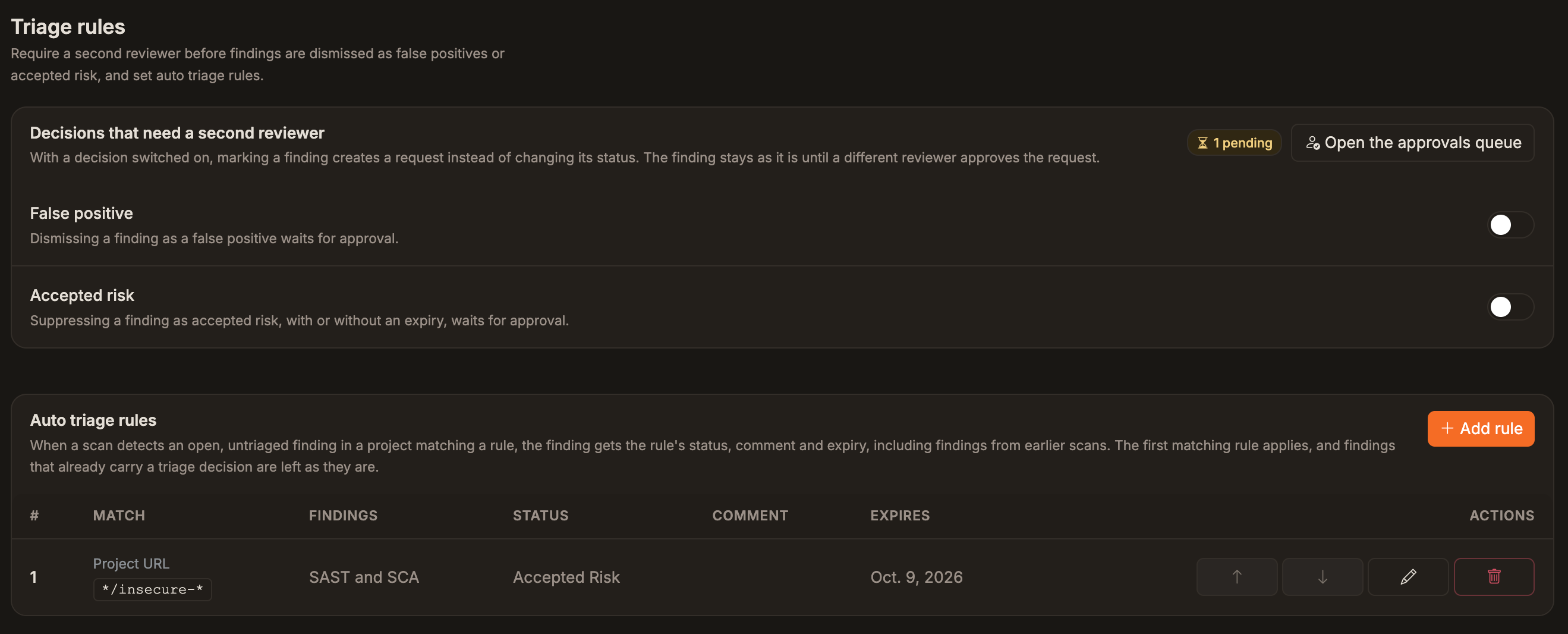 Admins choose which decisions need a second reviewer and, where enabled, set default triage for new findings by project pattern.
Docs: Triage justifications and approvals
Software supply chain
Stop malicious packages at the pull request, enforce license policy, and export an SBOM from any scan.
Block malicious packages
Corgea now classifies known-malicious dependencies in dependency scanning (v1.69.0). Add a Blocking Rule, and Corgea stops pull requests when a known-malicious package is detected.
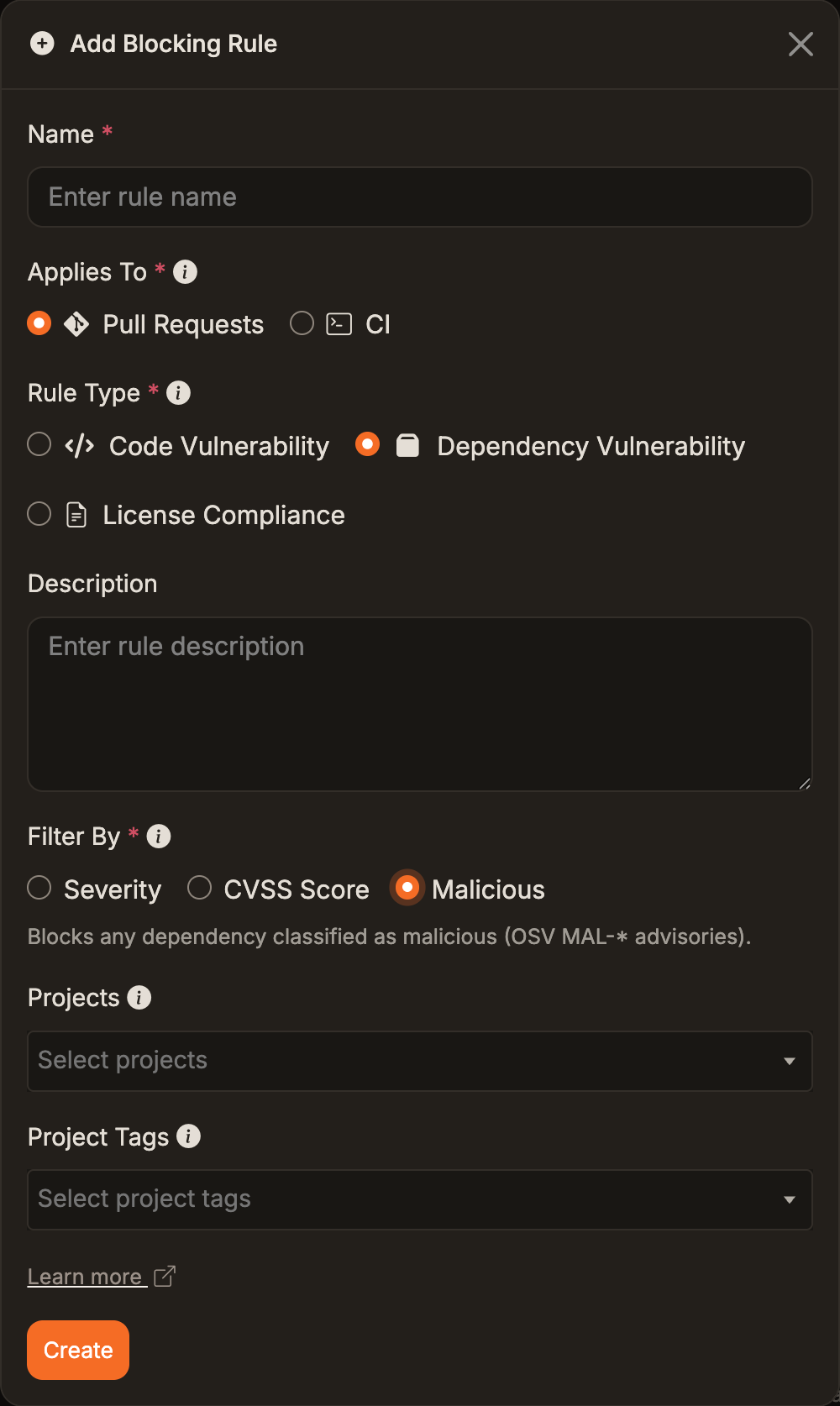 A pull request Blocking Rule set to block any dependency classified as malicious.
Know every license
Dependency lists show license badges, findings can be filtered by license, and direct dependencies are listed before transitive ones (v1.74.3). License-compliance Blocking Rules (v1.71.2) restrict whole license families or specific licenses.
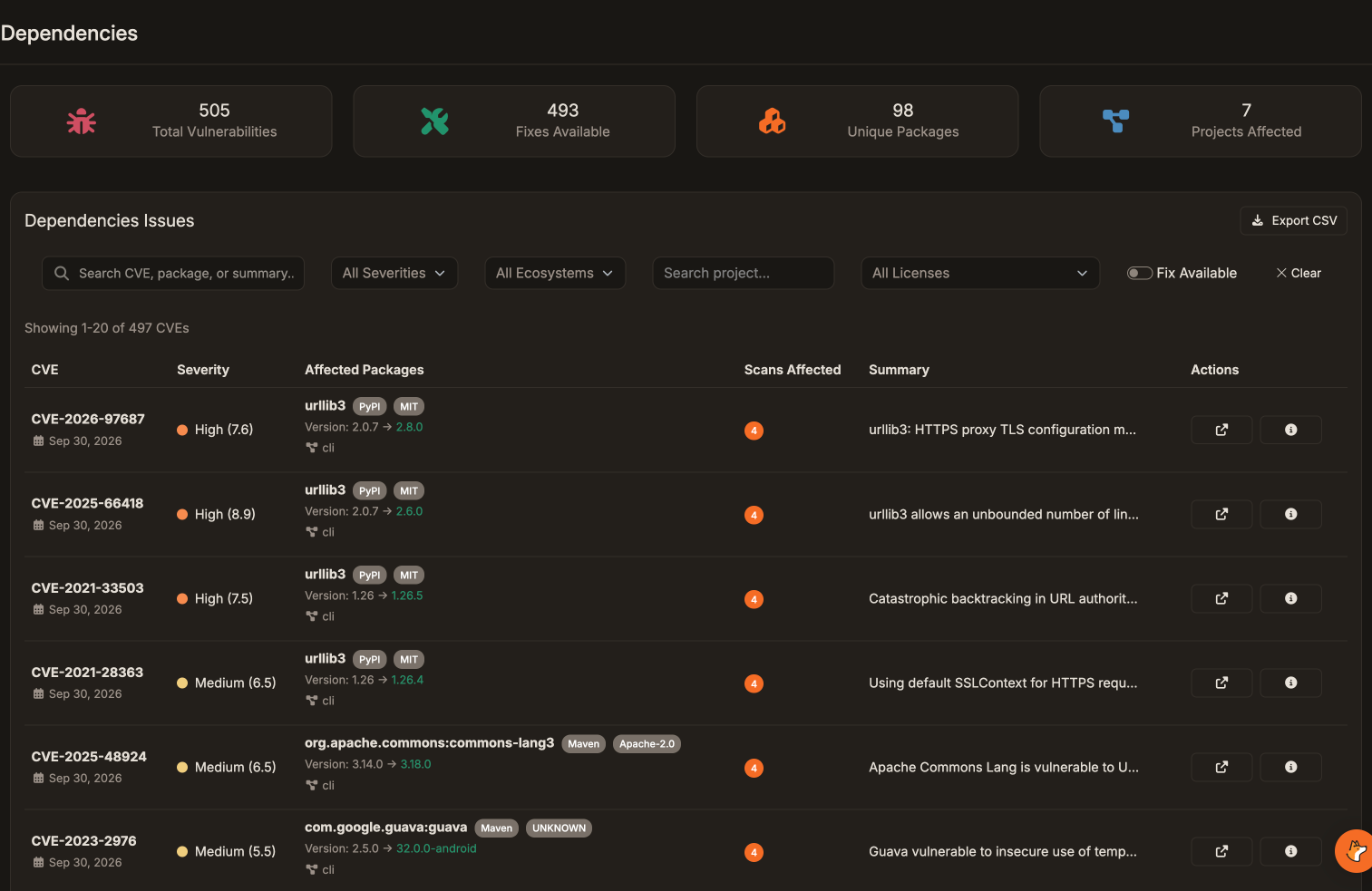 Dependency findings show each package’s ecosystem and license, and the license filter narrows the list.
Export an SBOM
Download a CycloneDX SBOM (see SBOMs and license enforcement) on demand from any completed scan’s dependency inventory (v1.77.0).
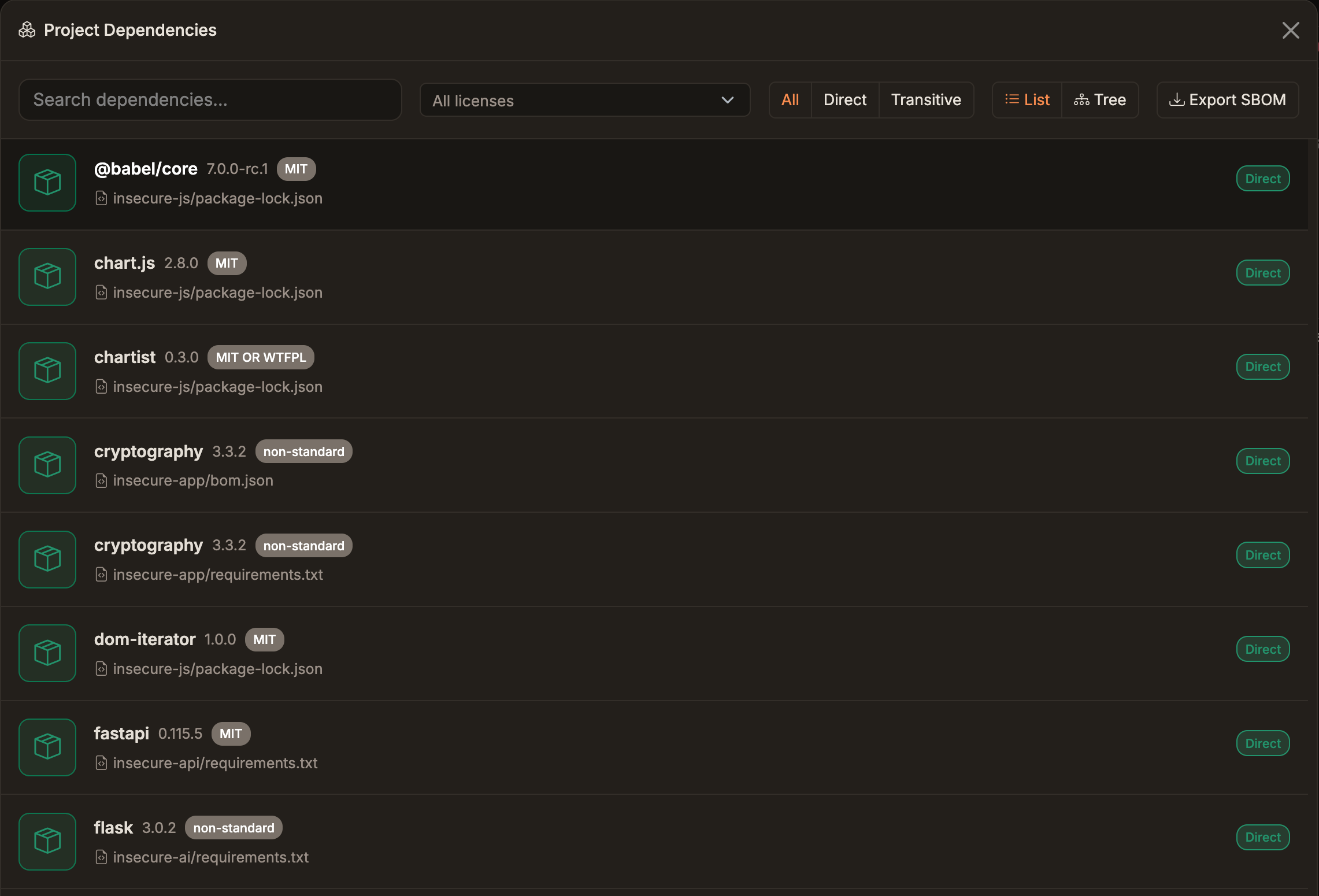 Filter a scan’s dependency inventory by license and depth, then export a CycloneDX SBOM.
Resolve internal packages
Enterprise customers on a dedicated tenant can connect private package registries for Maven, PyPI, and NuGet (v1.73.2). Dependency scans then resolve internal packages and their transitive dependencies. Registries apply company-wide or to selected projects.
More coverage
- Rust is supported across code, secret, and dependency scanning (v1.73.0).
- SCA, container, and IaC findings keep their triage, assignments, due dates, accepted-risk expirations, and SLA status across rescans (v1.74.1).
Docs: Dependency scanning · Private package registries · Blocking Rules
Built for AI coding agents
Bring Corgea into the AI coding tools your developers already use.
One command for MCP
CLI v1.13.0 adds corgea mcp install. It writes the Corgea MCP server into your agent’s config using the URL and token from corgea login. It supports Cursor, Claude Desktop, Claude Code, Windsurf, VS Code, Gemini CLI, Continue, and OpenCode.
corgea login
corgea mcp install --agent cursor
Restart the agent afterward. Without the CLI installed, the same flow runs through npx.
Over MCP, assistants can now also list code quality findings (v1.70.0), read scan metadata (v1.71.2), and report scan duration and queue wait by project, engine, or branch (v1.78.3).
The Corgea scan skill
Separately from MCP, the Add Project flow has an Agents tab with copyable commands that install the Corgea scan skill for one project or globally (v1.70.3). Then prompt your agent: “Scan this repository with Corgea.”
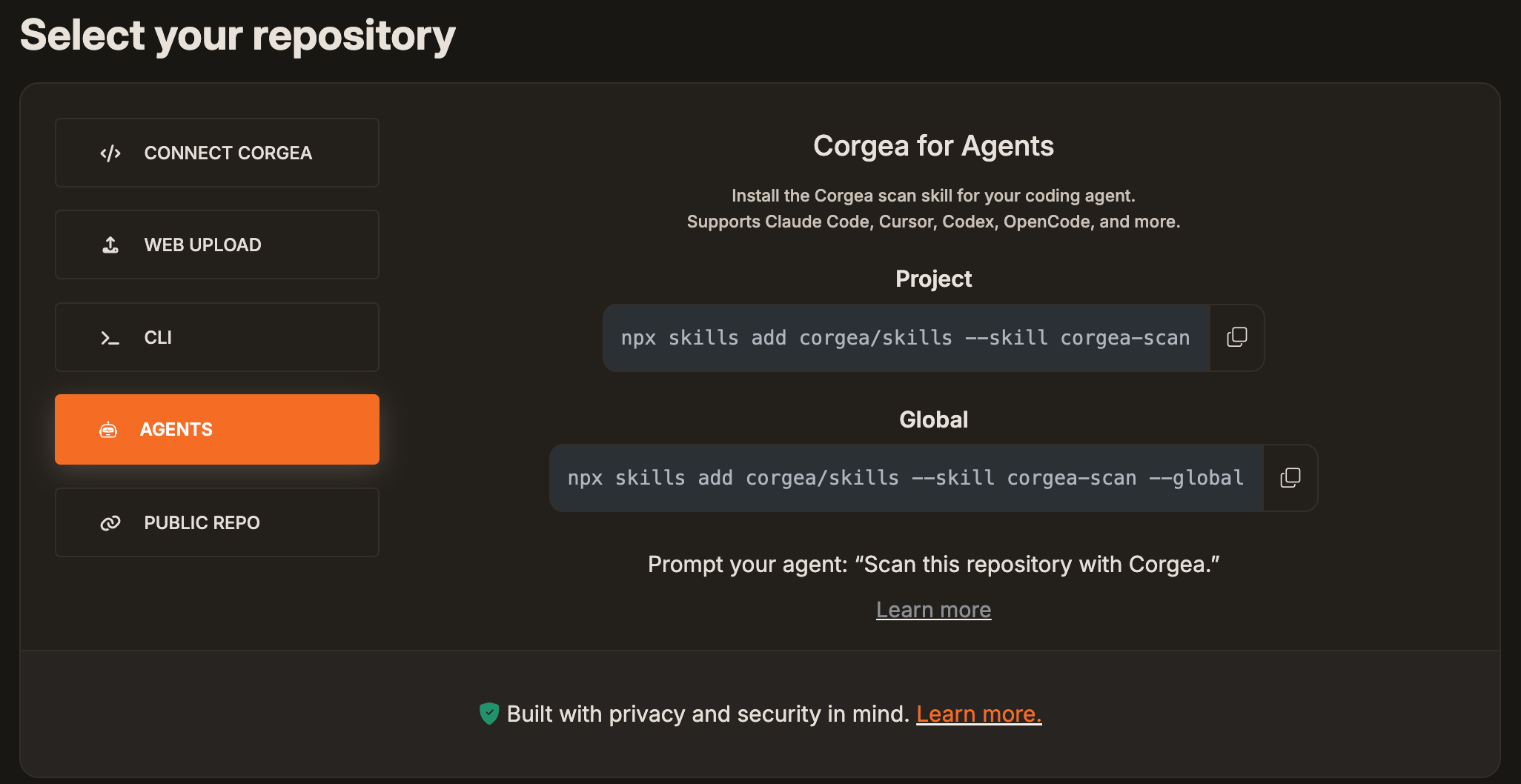 Add Project › Agents installs the Corgea scan skill, per project or globally. It’s separate from
 corgea mcp install.
Corgea Agent
Corgea Agent is now a top-level sidebar item (v1.76.3). It can list dependencies and generate CSV export links from a conversation (v1.67.0). On plans that include Agent Learnings, admins get a daily email digest of new learning recommendations (v1.76.3).
Docs: Install the MCP server · MCP tools · Agent skill
Faster scans in CI
Scans now do only the work a change requires, and CI gates are easier to tune.
Incremental by default
AI SAST scans from the CLI are incremental by default. The CLI diffs against the project’s last clean scan locally and analyzes only changed files. Pass --disable-incremental to analyze everything. Ignored files and README or config edits no longer trigger unnecessary scanning.
Where enabled, incremental scan revalidation (v1.79.0) keeps findings and triage decisions intact when code moves.
New API support for scan file manifests (v1.77.4) lets compatible clients scan only changed files in shallow clones and directories without Git history.
Less wasted work on pull requests
- GitHub PR scans wait until a draft is marked ready for review (v1.72.0).
- A newer push cancels the superseded scan without firing a scan-failed webhook (v1.77.3).
- PR scans and full scans have separate capacity, so neither blocks the other (v1.76.3).
Gates you can tune
CI Blocking Rules (v1.71.2, see our pipeline gating guide) are referenced from a pipeline with corgea scan --block-on <slug>. CI dependency rules can filter by reachability (v1.73.2), and code rules can target vulnerabilities, code quality findings, or both (v1.70.2). The CLI’s default blocking-rules wait is now 35 minutes, so gates outlast SCA reachability triage.
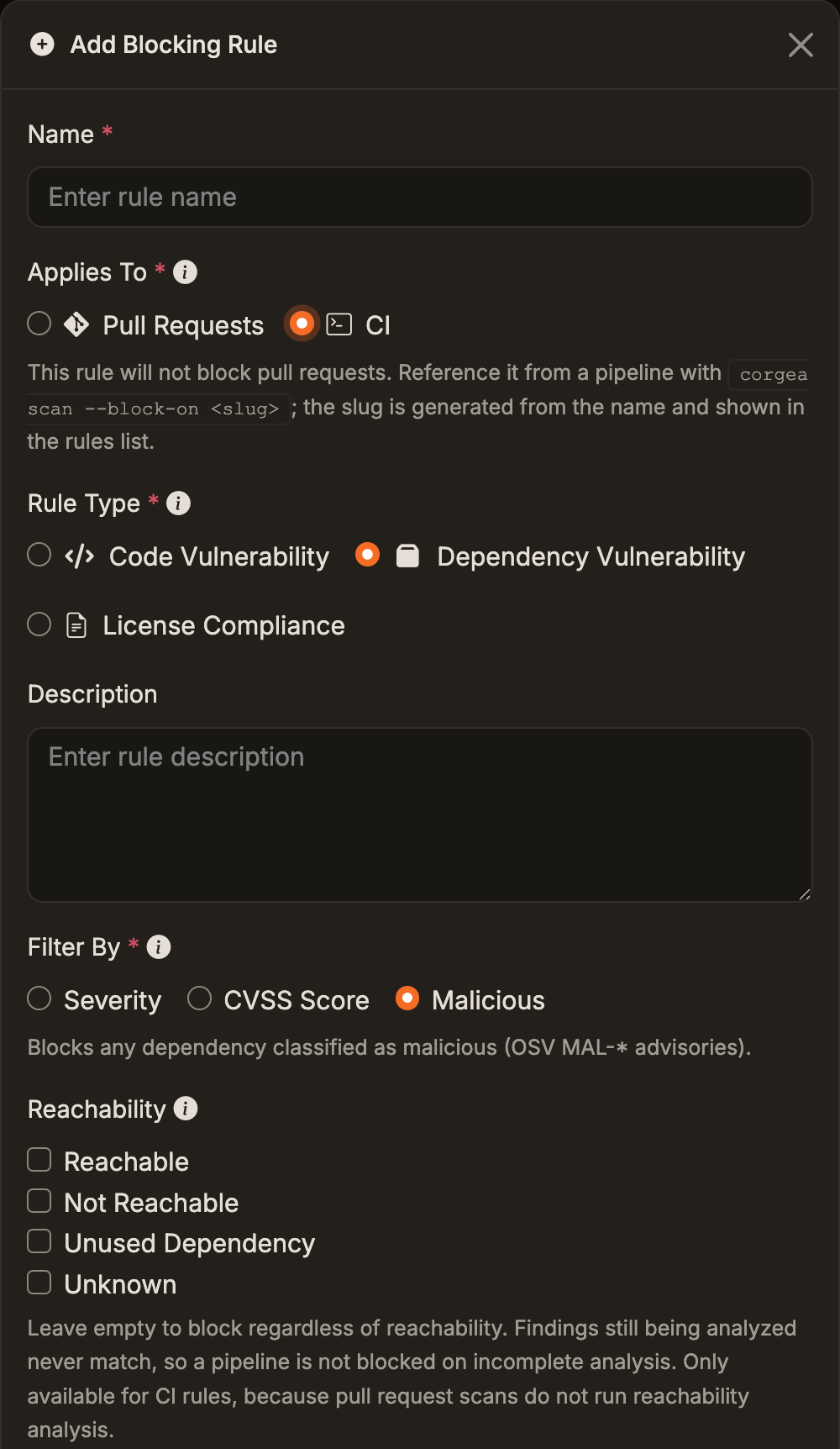 CI Blocking Rules are referenced from a pipeline by slug and can filter on reachability.
See what each scan covered
Scan Logs show per-engine status for every file, skipped files, and dependency resolution coverage (v1.69.0). File include rules (v1.78.2) name files and folders to always scan.
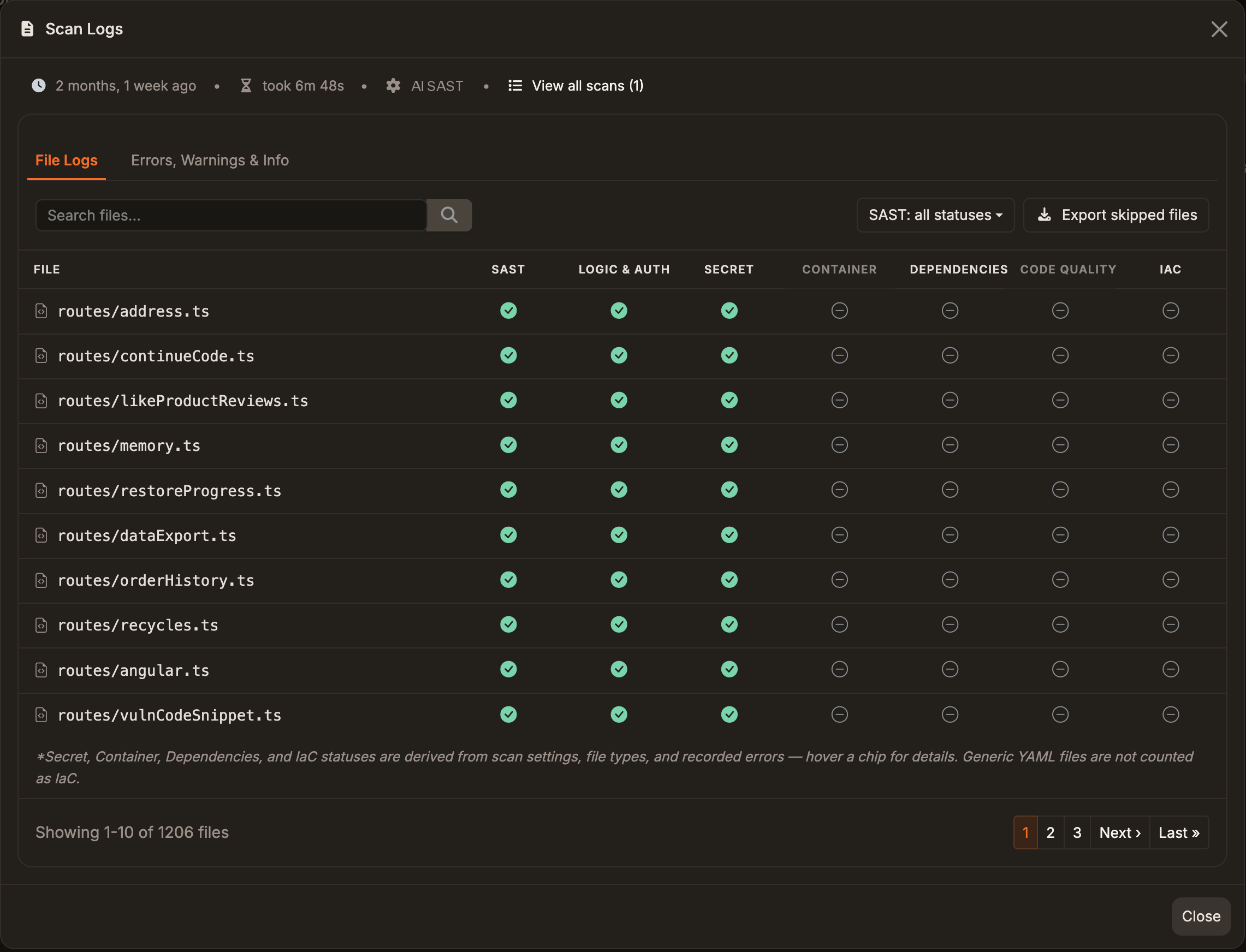 Scan Logs show which engines processed each file. Skipped files can be exported.
The roundup below covers the quarter’s performance work.
Docs: Incremental scans · Blocking Rules
Integrations and enterprise admin
Connect more of your stack and manage access with less manual work.
New and improved integrations
- Linear (v1.70.2): create tickets directly from vulnerability and dependency findings.
- Self-hosted GitLab (v1.70.0): custom hosts, and projects beyond the token owner’s direct memberships.
- Bitbucket (v1.75.3): run scans, with branch resolution and repository content retrieval.
- IntelliJ IDEA (v1.74.2): install the Corgea plugin from the Integrations page.
- Harness (v1.78.0, v1.78.3): a redesigned integrations dialog with search, status filters, and a details pane, with integrations that need attention listed first.
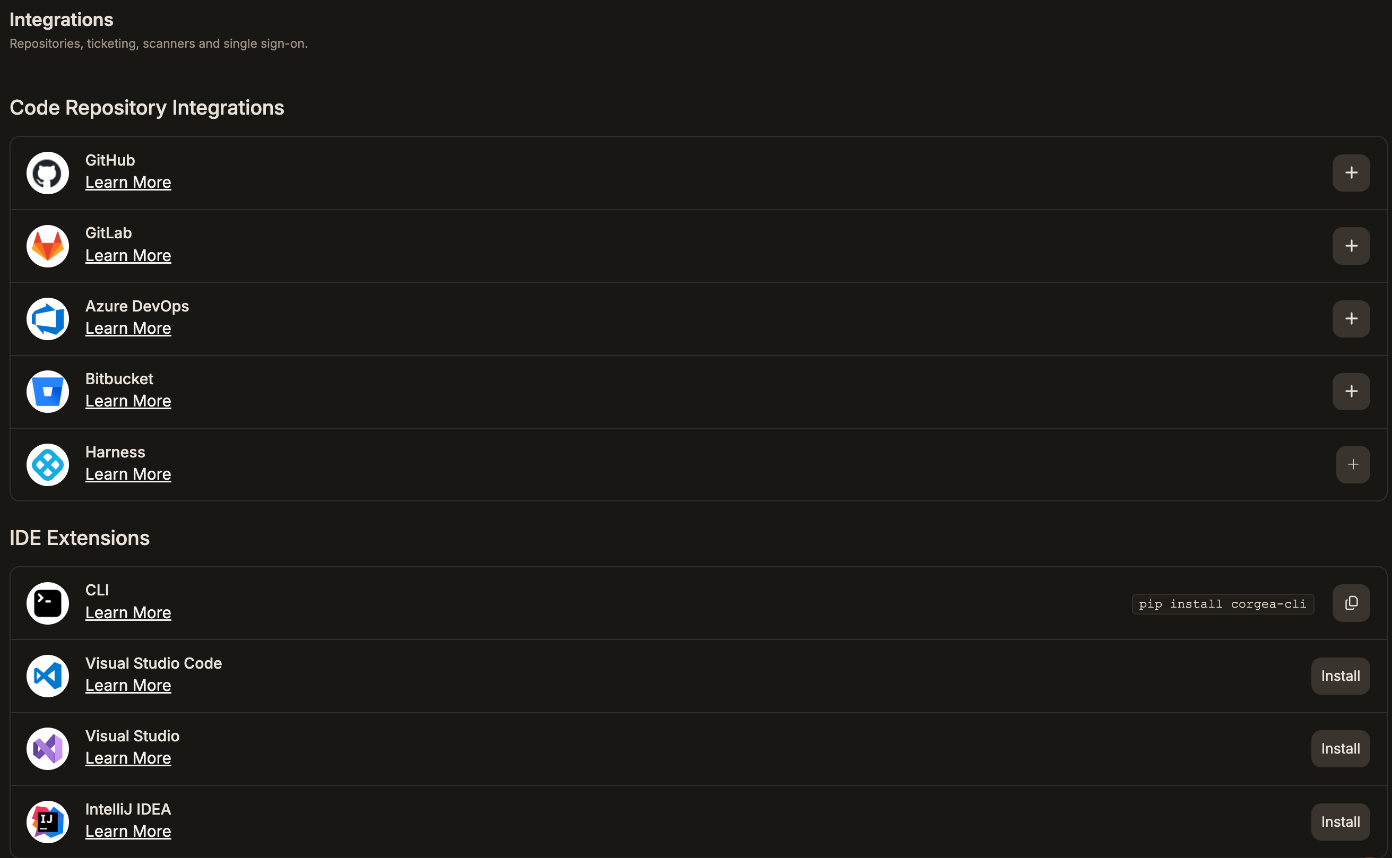 Repository integrations and IDE extensions, including the IntelliJ IDEA plugin, in one place.
 Create Jira or Linear tickets directly from findings.
Admins also get an email when GitLab, Azure DevOps, Bitbucket, or Harness credentials expire (v1.67.0).
Access and sign-in
- SSO group mapping (v1.70.2): a self-service editor maps identity-provider groups to Corgea roles and project access.
- GitHub team membership sync (v1.77.0): linked teams update when users join, and Sync membership runs it on demand.
- Dynamic team access (v1.71.1): teams automatically gain access to projects that match tags or repository URL fragments.
- Email OTP (v1.72.3): password users confirm sign-in with an emailed one-time password. Enabled SSO workspaces get an email OTP fallback for when their identity provider is down.
Webhooks
New events cover scheduled scan failures, expired accepted risks, expired integration credentials, and completed AI pentests (v1.74.0). Status-change payloads now include the acting user (v1.73.0).
Docs: Linear · Bitbucket · SSO · Webhooks
Reporting and exports
Share results with people who don’t log in to Corgea, and send cleaner data to the tools that do.
- Branded PDF reports (v1.70.0, building on Corgea reporting): export a scan’s findings with issue-type and urgency filters, severity summaries, and links back to each finding.
- PDFs for clean scans (v1.72.2, v1.73.0): download a complete report even when a scan has no findings, in the app or through the API.
- Better SARIF: exports now carry finding guidance, security severity, policy taxonomies, call-graph context, fingerprints, and remediation details (v1.69.0). SCA findings ship as a separate run (v1.73.3). Fixed, false-positive, and accepted-risk SAST findings are left out, so CI tools stop re-flagging them (v1.79.5).
- Faster reports: vulnerability and aging reports, mean time to remediation, and burndown charts load faster.
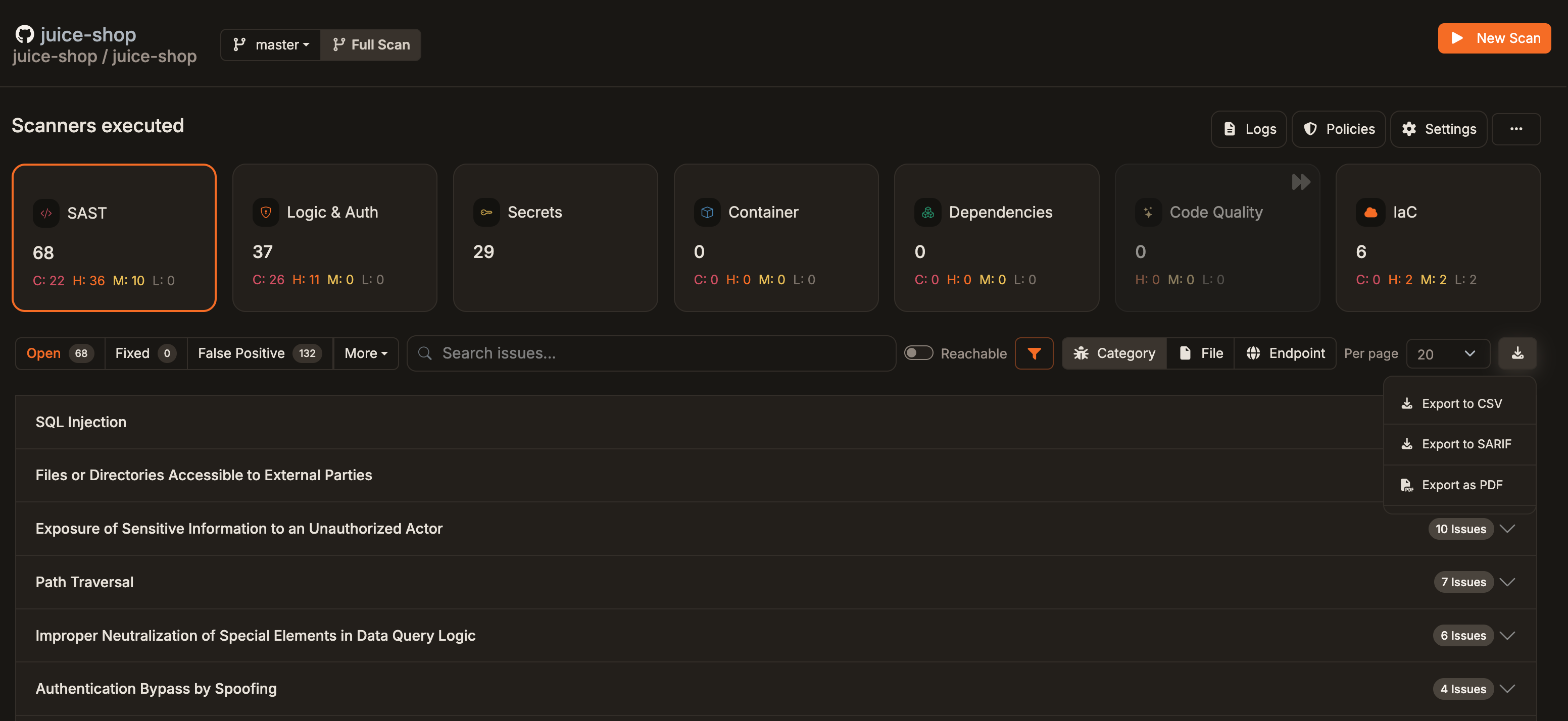 Export a scan’s findings as CSV, SARIF, or a branded PDF report.
Docs: Exporting findings
Everything else we shipped
Performance and reliability
- Scans: concurrent processing, safe recovery of interrupted work, and fewer memory-related failures on large scans.
- Pages: a faster Workbench, issue pages, Advanced Search, and scans list, with in-place updates for active scans.
- GitHub: fewer API calls during PR scans, and check updates and fix comments that retry after rate limits reset.
- Triage carry-forward: SCA decisions and finding history hold across rescans in more cases.
- CLI (v1.14.x): automatic retries on
429responses, and on502for reads only, which avoids duplicate scans.
Scanning and policies
- Scheduled scans can include IaC and container scanning (v1.71.1).
- Repository-defined policies apply during scans (v1.74.2), and third-party
corgea uploadincludescorgea.yamlpolicy files automatically (CLI v1.14.0). - Explanations and suggested fixes show guidance from applicable policies (v1.76.1).
- A redesigned Policy Playground (v1.69.0), and comments on file ignore rules and CWE filters (v1.67.0).
- PR comments anchor only to valid changed lines (v1.74.2).
- A project that fails the same scheduled scan three times in a row triggers an email and is skipped until a scan succeeds (v1.70.2).
UI and experience
- A more consistent design system (v1.69.0), a redesigned sidebar and settings (v1.74.2), and a selectable display timezone (v1.70.0).
- Guided connect-and-scan onboarding with a sample project (v1.70.0).
- Clearer scan details, repository paths in scan lists, and page-size controls.
- Faster command palette search and better contrast in light and dark themes (v1.77.2).
Notifications and webhooks
- Admins choose email recipients: company admins, selected teams, or everyone, including for SLA and scheduled-scan failures (v1.77.2).
- Status-change and assignment webhooks now fire for dependency, container, and IaC findings (v1.76.4).
API
wait_for_the_fix=truewaits for Generate Fix results (v1.76.0).- Group code findings by file and dependency findings by package (v1.76.2).
- Filter scans by up to 50 commit SHAs, and retrieve scanner metadata such as Fortify instance IDs with
include_metadata=true(v1.79.3). - Failure reasons and scanner-level errors in scan responses (v1.71.0), plus an endpoint that reports the web app version (v1.72.0).
How to get it
The Corgea platform updates continuously, so there’s nothing to install for web app features. They’re already live.
- CLI features need the latest
corgeaCLI.corgea mcp installrequires v1.13 or later. See the CLI docs to install or upgrade. - Plan-gated features: the Vulnerabilities Workbench and Agent Learnings are available on supported plans.
- Enabled per company: automatic triage rules, incremental scan revalidation, triage suggestions, and pentest email inboxes are rolling out company by company.
- AI Penetration Testing is a beta add-on.
- Private package registries are for enterprise customers on a dedicated tenant. They’re enabled per organization and off by default.
To turn any of these on, talk to your account team or email sales@corgea.com. For private package registries, the docs route requests to support@corgea.com.
See it for yourself
Every Q3 change, release by release, is in the changelog. Setup guides for everything above are in the docs.
New to Corgea? Book a demo and we’ll show you around.